AI portrait prompt ideas for social media — how to customize without copying another creator
Answer first: Use the ready-to-run prompts below, then change at least three elements—subject, lighting, colour palette or prop—to make your result unique. Follow the workflow and aspect-ratio guidance to create shareable portraits without repeating someone else’s exact style.
Why originality matters (and how small changes avoid copying)
Viral portrait prompts often spread quickly. Repeating a popular prompt verbatim can produce similar outputs and reduce your unique creative voice. You don’t need to invent a whole new idea—simple, intentional changes keep the concept fresh:
- Swap the subject details (age, ethnicity, outfit).
- Change lighting and colour palette (warm vs cool, neon vs natural).
- Add or remove props and background elements.
- Adjust camera intent (close-up, 3/4 body, low-angle) and aspect ratio.
How to use this article
Pick a prompt from the groups below, replace placeholder tokens like {subject}, {outfit}, {mood} and {location}, then tweak at least three attributes before sharing. If you need to resize, crop or compress the final image for social uploads, use our Smart Image Resizer, Converter & Compressor: Smart Image Resizer. For cover or thumbnail workflows, see our resize guide: YouTube/Instagram Resize Workflow.
Prompt groups — 30 copy-ready AI portrait prompts (replace placeholders)
Below are 30 original prompts grouped by style. Each prompt includes placeholders you should fill and quick suggestions for one customization you can make right away.
Cinematic & Moody (6 prompts)
- “{subject}, close-up portrait, cinematic low-key lighting, rim light on hair, shallow depth of field, muted teal and orange colour grade, photorealistic, 85mm lens look” — customize: switch to high-contrast black & white.
- “{subject}, rainy street reflection background, neon signs blurred bokeh, cool blue tones, contemplative expression, film-grain texture” — customize: change neon to warm amber shop lights.
- “{subject} seated by a window, golden hour sidelighting, soft film backlight, gentle freckles, vintage film dye transfer look” — customize: alter to overcast softbox lighting.
- “{subject} mid-shot, dramatic single-spotlight, heavy shadows, textured wall background, moody editorial feel” — customize: add a colorful scarf prop.
- “{subject}, low-angle portrait, city skyline silhouette at dusk, subtle lens flare, cinematic teal shadows” — customize: shoot at dawn for different colour tones.
- “{subject}, profile portrait, warm tungsten rim light, bokeh candle background, nostalgic atmosphere” — customize: substitute candles with string lights.
Bright Influencer & Lifestyle (6 prompts)
- “{subject}, smiling lifestyle portrait, soft natural window light, pastel colour palette, candid pose, high-key exposure, clean skin retouch” — customize: change to a bold colour palette.
- “{subject}, coffee shop candid, shallow depth, warm tones, hand-holding-cup prop, friendly mood, slight vignette” — customize: move scene outdoors to a garden cafe.
- “{subject} in motion, hair toss, crisp freeze-frame, bright daylight, saturated colours, modern streetwear” — customize: use monochrome outfit for contrast.
- “{subject}, colourful mural background, candid laugh, wide-angle environmental portrait, vibrant saturation, editorial crop” — customize: replace mural with historical architecture.
- “{subject}, relaxed home portrait, cozy sweater, soft throw pillow, warm lamp light, authentic social-media tone” — customize: swap sweater for formal blazer for a hybrid look.
- “{subject}, bright lifestyle close-up, freckles visible, natural makeup, soft sharpness, optimistic expression” — customize: add warm sun flare over shoulder.
High-Fashion & Editorial (4 prompts)
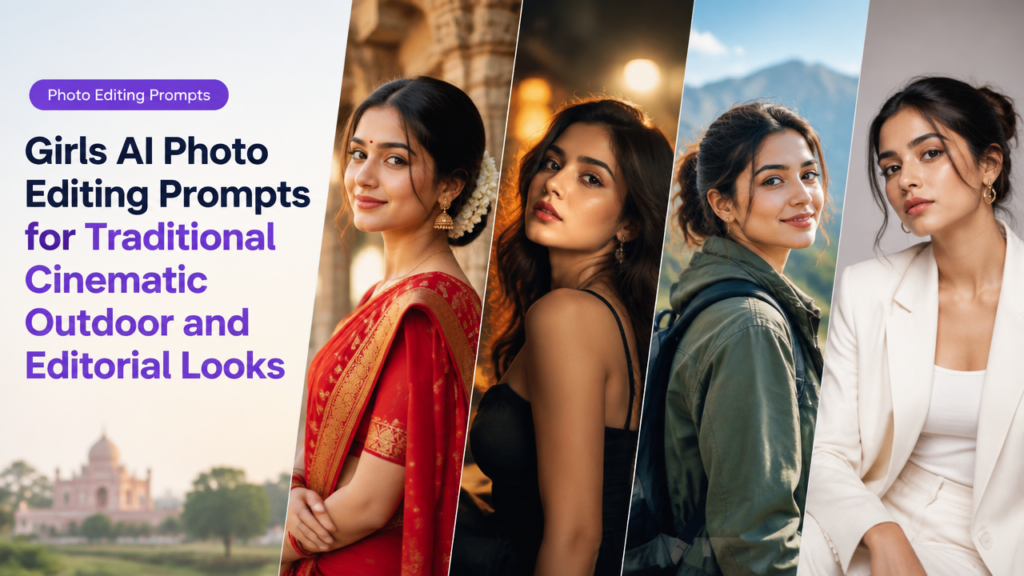
- “{subject}, high-fashion studio portrait, directional beauty light, matte skin finish, bold statement outfit, minimal background” — customize: change outfit to traditional ethnic wear for cultural editorial.
- “{subject}, avant-garde makeup, sculptural hairstyling, dramatic shadows, glossy floor reflection, runway-inspired composition” — customize: swap sculptural hair for clean bun.
- “{subject}, full-length editorial, dramatic pose, textured fabric, low-contrast monochrome, glossy magazine finish” — customize: change to vibrant colour grading and matte paper look.
- “{subject}, mixed-material outfit with metallic accents, high-key studio, painterly retouch, cinematic crop” — customize: tone down metallics and focus on natural fabrics.
Artistic & Surreal (6 prompts)
- “{subject}, portrait with floating petals, soft ethereal glow, pastel haze, shallow depth, dreamlike composition” — customize: change petals to autumn leaves.
- “{subject}, portrait with double exposure of city map, translucent overlay, muted colour wash, introspective mood” — customize: use a nature overlay instead of a map.
- “{subject}, portrait under cinematic coloured gel lights (magenta + teal), subtle smoky atmosphere, surreal mood” — customize: change gel colours to purple and gold.
- “{subject}, levitating prop (book or camera) beside head, soft rim light, painterly texture, slightly stylized realism” — customize: change prop to a symbolic object meaningful to you.
- “{subject}, portrait with hand-painted brushstroke background and analogue film grain, warm palette” — customize: switch to cool palette and bold brush strokes.
- “{subject}, portrait framed by geometric light shapes, high contrast, modern surreal editorial” — customize: use organic shapes instead of geometric ones.
Professional Headshots & Clean Looks (2 prompts)
- “{subject}, clean corporate headshot, neutral background, soft even light, minimal retouch, natural skin tones, 3/4 crop” — customize: pick a subtle coloured backdrop for brand coherence.
- “{subject}, creative professional headshot, textured wall, relaxed pose, slightly desaturated, crisp eyes, realistic detail” — customize: adjust pose to seated for different energy.
Quick customization playbook — change three things
To avoid copying, always change at least three of these elements:
- Subject specifics: age, hairstyle, clothing, accessories.
- Lighting: golden hour, neon, high-key, low-key, sidelighting.
- Colour palette: warm, cool, pastel, saturated, desaturated.
- Composition: close-up, mid-shot, 3/4, negative space, low angle.
- Background/props: swap location or key prop.
Aspect ratios, composition and social media notes
Common aspect ratios for portraits are 1:1 (square), 4:5 or 8:10 (tall portrait), and 9:16 (vertical for story/reel cover). Use these as starting points but always confirm the platform requirements before final export.
- 1:1 — good for profile grids and balanced composition.
- 4:5 — Instagram feed portrait-friendly, shows more of the subject vertically.
- 9:16 — for story or reel covers; use with care because faces close to edges may be cropped in different views.
Composition tips:
- Place the eyes roughly one-third from the top of the frame for portraits.
- Keep important elements inside a safe area if the final image might be used as a thumbnail—see our thumbnail resize workflow: thumbnail guide.
- Leave breathing room around the subject if you plan to add text overlays.
Short step-by-step workflow (generate → refine → export)
- Choose a base prompt from the lists above and replace placeholders with subject details.
- Tweak at least three elements (see playbook) to make it yours.
- Set aspect ratio and camera intent (e.g., “85mm portrait, shallow DOF”).
- Generate multiple variations; pick 2–4 strong options.
- Refine using editing tools (crop, subtle retouch, colour grade).
- Resize or compress to platform-safe size using Smart Image Resizer: smartimageresize.com. For batch work use our bulk workflow guide: Bulk Image Resize Workflow.
- Export with appropriate format (JPEG for general uploads, WebP for web where supported) and add alt text and filename for image SEO.
Practical checklist before posting (table)
| Item | Why it matters | Quick action |
|---|---|---|
| Originality check | Avoid direct copying | Change 3 elements |
| Aspect ratio | Platform display varies | Set to 1:1, 4:5 or 9:16 |
| Safe crop | Thumbnails may crop edges | Keep face inside safe area |
| File size | Faster uploads & better mobile experience | Compress if >1–2MB |
| Alt text & filename | Image SEO & accessibility | Write descriptive alt text and clear filename |
Common mistakes and tips for better results
- Copying too literally: Many viral prompts include a distinctive mood or colour grade—copying it exactly yields similar images. Change composition, props and palette.
- Over-directing the model: Very long, contradictory prompts confuse generators. Keep prompts focused and add negative prompts for unwanted elements.
- Ignoring safe areas: Thumbnails and profile crops often cut off edges. Leave breathing room especially for tall crops.
- Too much retouch: Heavy smoothing removes texture and authenticity. Use subtle retouching for social media.
- No attribution rules: If a prompt explicitly references a commercial artwork or a living artist’s style, avoid it. Prefer neutral descriptors.
Frequently Asked Questions
Conclusion
These 30 AI portrait prompt ideas give you a head start, but the creative difference comes from how you customise them. Change multiple elements, mind composition and aspect ratio, and follow a short generate→refine→export workflow. Use image tools on SmartImageResize for resizing and batch work and develop a small brand glossary to keep your portraits recognisably yours without copying another creator.
Related reading: try our Indian festival prompt ideas for culturally respectful portrait options: Indian Festival AI Photo Prompts.
Editorial note: This article focuses on creative workflow and prompt customization. Always follow the usage rules and content policies of the platform or AI tool you use.
Try the matching Smart Image Resize tool
Use the closest live SmartImageResize tool for the task in this guide. For government or platform uploads, verify the latest official requirement before final submission.